 Prime Intelligence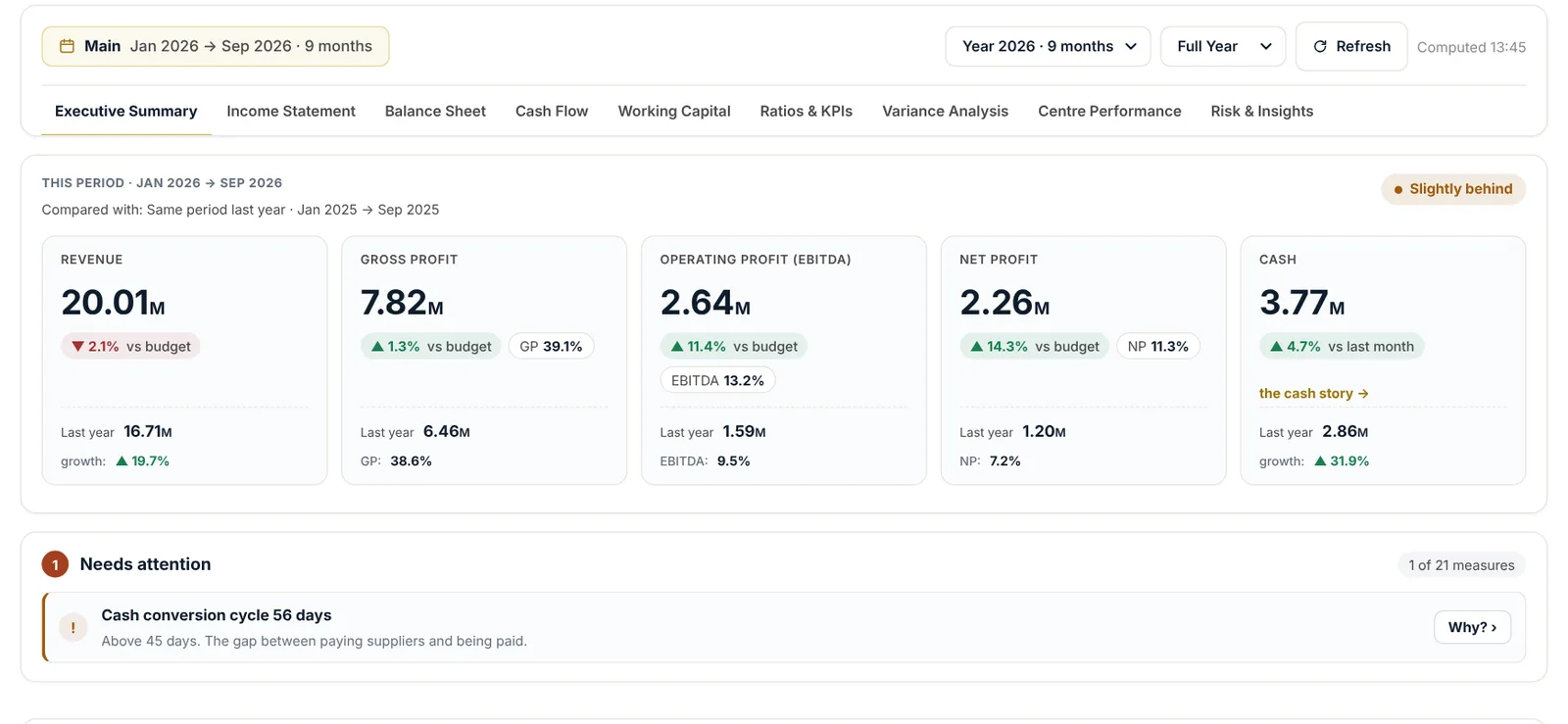
Choose the period
The period chip shows the company and the months covered. Choose the year, a single month or the full year, and press Refresh after a sync. The time it was computed is shown beside it.
The nine views
- Executive summary: revenue, gross profit, EBITDA, net profit and cash against budget and last year, with a one-line verdict and what needs attention.
- Income statement, balance sheet and cash flow, built from your ledger, with the accounts behind each line.
- Working capital: days to collect, days of stock, days to pay and the cash cycle.
- Ratios & KPIs against the targets you set for your company.
- Variance analysis: what moved against budget, and why.
- Centre performance: each revenue and cost centre side by side.
- Risk & insights: the warning signs, each with its reason.
Explore your numbers
Pick any measure and show it as a line, bars, an area or a table, against the budget, last year or both, monthly, quarterly or as a running total. Download the chart as an image or the table as CSV.
Good to know
Why? beside an item in Needs attention explains it in plain words, with the figures that triggered it.
Questions
Which budget is the board compared with?
The budget you prepared in Budget & Forecast for the year on screen. If there is none for that year, the board says why instead of showing a blank.
Still need help?
Our team answers on WhatsApp and by email.