 Prime Intelligence
The five steps
- Departments: choose the budget year, the month it starts and your type of business, then list your departments as revenue or cost centres.
- Write the budget: every centre has its lines, with the annual amount and the monthly figure beside it. Type a figure and it is saved at once.
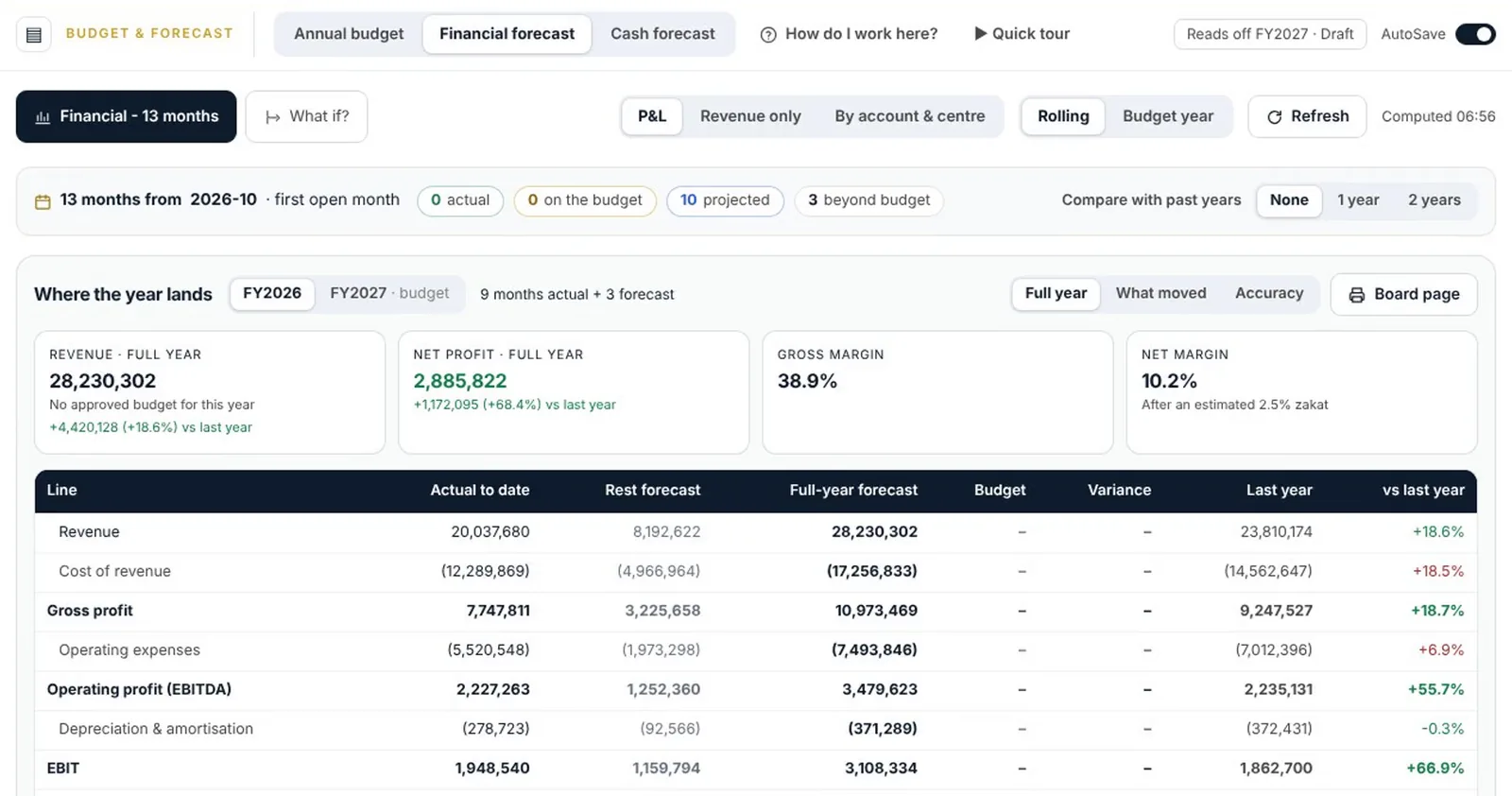
- The proposed budget: Nabd builds a budget from your history, decision by decision. Try an idea, such as prices up five percent, and see revenue, net profit and the lowest cash change at once.
- Targets and gap: add what the board wants, then see the gap target by target and decide to raise the budget, lower the target or explain why both stay.
- Approve and freeze: submit for review. Once approved, it is frozen as the original and tracked month by month.
Good to know
- Switch between annual and monthly, filter by revenue, costs and expenses, or read the whole income statement.
- Applying a proposal keeps what was there before, so you can undo.
- Prepare and Govern hold capital expenditure, departmental budgets, the historical baseline, transfers and amendments of an approved budget.
Questions
Can I change an approved budget?
Yes, through a transfer or an amendment under approval. The original stays on record beside the amended version.
Still need help?
Our team answers on WhatsApp and by email.